[ 애니 리스트 필터 추가]
기존 애니 리스트는 조건이 단순했다.
- 검색은 사용자가 검색 버튼을
눌렀을 때만 조건이 확정되는 구조였다. - 정렬은 사용자가 정렬 옵션을
바꾸는 즉시 조건이 바뀌는 구조였다.
여기까지는 조건이 2개(검색, 정렬)라서 문제가 없었는데
연도/분기 필터가 들어오면 상황이 달라진다.
- 조건 조합이 늘어난다
: 검색 + 정렬 + 연도 + 분기 - 페이지네이션과 결합이 강해진다
: 필터가 바뀌면 보통 1페이지로 돌아가야 자연스럽다. - 필터는 ‘선택하는 과정’이 존재한다
: 연도/분기를 고르는 중간마다 목록이 바뀌면 화면이 변경.
그래서 필터는 ‘선택 단계’와 ‘적용 단계’를 분리해서,
사용자가 의도한 순간에만 목록이 갱신되도록 설계했다.
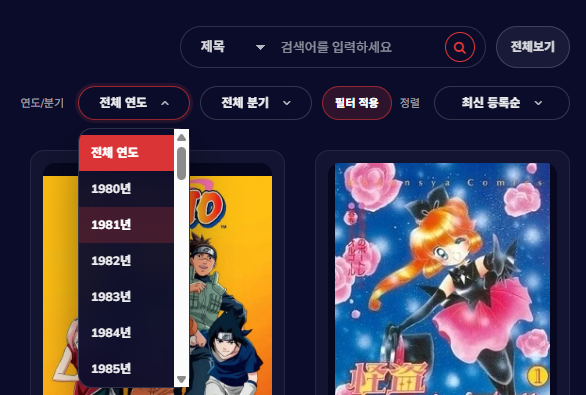
필터가 추가된 화면 미리보기

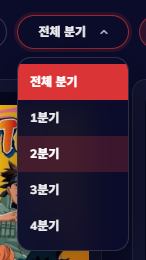
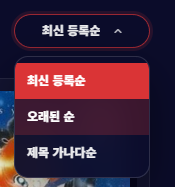
통일된 커스텀 셀렉트 박스
1. 목표
이번 작업의 목표는 3가지다
- 필터 조건을 비동기 목록 갱신(loadAnimeList)
흐름에 자연스럽게 합류시키기 - 연도/분기는 ‘적용 버튼’을 눌렀을 때만
서버 조건으로 확정되게 만들기 - 필터/정렬 UI 톤을 통일하고(hover 색상 포함),
검색 UI와 함께 상단 컨트롤의 배치를 안정화하기
2. 변경된 전체 동작 흐름
필터가 추가되면서 핵심 흐름은
조건이 늘어나도 목록 갱신 경로를
하나로 고정하는 것이다.
전체 흐름
1) 최초 진입
loadAnimeList(1) 호출로 리스트 렌더링 시작
↓
2) 검색
검색 버튼/엔터 시점에 condition/keyword 확정
loadAnimeList(1) 호출
↓
3) 정렬
정렬 선택 즉시 currentSort 확정
loadAnimeList(1) 호출
↓
4) 필터(연도/분기)
드롭다운 선택은 uiYear/uiQuarter만 변경(목록 갱신 없음)
‘필터 적용’ 버튼에서 filterYear/filterQuarter 확정
loadAnimeList(1) 호출
↓
5) 페이지네이션
페이지 클릭 시 loadAnimeList(page) 호출
↓
6) 공통 후처리(항상 동일)
renderAnimeList(data.animeList)
renderPaging(data.paging)
syncFilterUI(data.paging)로 UI 상태를 서버 기준으로 고정
여기서 필터가 흔들리지 않는 핵심은
‘선택값(ui*)’과 ‘서버 반영값(filter*)’을 분리한 구조다.
3. JSP: 상단 컨트롤 구조(검색 1줄, 필터+정렬 2줄)
상단 컨트롤은 2줄 구조로 고정한다.
- 1줄: 검색 + 전체보기 + (관리자일 때 애니 추가)
- 2줄: 연도/분기 필터 + 필터 적용 + 정렬
그리고 카드 리스트(#animeContainer)는
반드시 title 영역 밖에 둔다.
title row 안에 넣으면 레이아웃이 깨지거나
‘날아간 것처럼’ 보이는 문제가 생긴다.
JSP 핵심 구조
<!-- 제목 + 우측 컨트롤 -->
<div class="product__page__title">
  <div class="row align-items-center">
    <div class="col-lg-8">
      <div class="section-title">
        <h4>애니</h4>
      </div>
    </div>

    <div class="col-lg-4">
      <div class="anime-controls">

        <!-- 1줄: 검색 + 전체보기 (+ 관리자) -->
        <div class="anime-search-wrapper">
          <div class="anime-search-box">
            <select id="animeSearchType">
              <option value="ANIME_SEARCH_TITLE">제목</option>
              <option value="ANIME_SEARCH_STORY">줄거리</option>
            </select>

            <input type="text" id="animeSearchInput" placeholder="검색어를 입력하세요">

            <button type="button" id="animeSearchBtn">
              <i class="fa fa-search"></i>
            </button>
          </div>

          <button type="button" id="animeResetBtn" class="anime-reset-btn">전체보기</button>

          <c:if test="${fn:toUpperCase(sessionScope.memberRole) eq 'ADMIN'}">
            <a class="anime-admin-btn" href="${pageContext.request.contextPath}/animeWritePage">애니 추가</a>
          </c:if>
        </div>

        <!-- 2줄: 연도/분기 + 정렬 (같은 라인) -->
        <div class="anime-sub-controls">

          <!-- 필터: 연도/분기 -->
          <div class="product__page__filter filter-box">
            <p>연도/분기</p>

            <!-- 커스텀 드롭다운: Year -->
            <div class="am-dd am-dd--year" id="ddYear" data-value="ALL">
              <button type="button" class="am-dd__btn" aria-expanded="false">
                <span class="am-dd__text">전체 연도</span>
                <i class="fa fa-angle-down am-dd__chev"></i>
              </button>
              <ul class="am-dd__list" role="listbox">
                <li class="active" data-value="ALL">전체 연도</li>
                <c:forEach var="y" begin="1980" end="2026">
                  <li data-value="${y}">${y}년</li>
                </c:forEach>
              </ul>
            </div>

            <!-- 커스텀 드롭다운: Quarter -->
            <div class="am-dd am-dd--quarter" id="ddQuarter" data-value="ALL">
              <button type="button" class="am-dd__btn" aria-expanded="false">
                <span class="am-dd__text">전체 분기</span>
                <i class="fa fa-angle-down am-dd__chev"></i>
              </button>
              <ul class="am-dd__list" role="listbox">
                <li class="active" data-value="ALL">전체 분기</li>
                <c:forEach var="q" begin="1" end="4">
                  <li data-value="${q}">${q}분기</li>
                </c:forEach>
              </ul>
            </div>

            <button type="button" id="filterApplyBtn" class="anime-filter-apply">필터 적용</button>
            <span id="filterStatus" class="filter-status"></span>
          </div>

          <!-- 정렬 -->
          <div class="product__page__filter sort-box">
            <p>정렬</p>

            <!-- 커스텀 드롭다운: Sort -->
            <div class="am-dd am-dd--sort" id="ddSort" data-value="RECENT">
              <button type="button" class="am-dd__btn" aria-expanded="false">
                <span class="am-dd__text">최신 등록순</span>
                <i class="fa fa-angle-down am-dd__chev"></i>
              </button>
              <ul class="am-dd__list" role="listbox">
                <li class="active" data-value="RECENT">최신 등록순</li>
                <li data-value="OLDEST">오래된 순</li>
                <li data-value="TITLE">제목 가나다순</li>
              </ul>
            </div>
          </div>

        </div><!-- /.anime-sub-controls -->

      </div><!-- /.anime-controls -->
    </div>
  </div><!-- /.row -->
</div><!-- /.product__page__title -->

<!-- 카드 리스트는 title 밖 -->
<div class="row" id="animeContainer"></div>

<div class="search-result-wrapper" id="searchEmpty" style="display:none;">
  <div class="search-empty">검색 결과가 없습니다.</div>
</div>

<div class="row">
  <div class="col-lg-12">
    <div class="pagination-wrapper">
      <ul class="anime-pagination" id="pagingArea"></ul>
    </div>
  </div>
</div>
4. JS 상태 설계: 필터는 ‘선택값’과 ‘적용값’을 분리한다
필터 UX를 안정적으로 만들려면 상태를 두 단계로 나눈다.
1) uiYear/uiQuarter
- 드롭다운에서 사용자가 선택 중인 값
- 아직 서버에 반영되지 않은 값
2) filterYear/filterQuarter
- ‘필터 적용’을 눌렀을 때 확정되는 값
- 실제 요청 파라미터로 사용되는 값
정렬은 즉시 반영되는 구조라
currentSort는 선택 즉시 바꾼다.
상태 변수 선언(핵심)
const contextPath = '<%=request.getContextPath()%>';

// 정렬: 선택 즉시 반영
let currentSort = 'RECENT';

// 필터: UI 선택값(적용 전)
let uiYear = 'ALL';
let uiQuarter = 'ALL';

// 필터: 서버 반영값(적용 후)
let filterYear = null;
let filterQuarter = null;

// 검색 조건
let condition = 'ANIME_LIST_RECENT';
let keyword = null;
5. 커스텀 드롭다운 로직: 열기/닫기/선택을 공통화한다
드롭다운을 페이지에 여러 개(연도, 분기, 정렬) 쓰면
이벤트 로직이 중복되기 쉽다.
그래서 공통 함수 3개로 통일한다.
- closeAllDropdowns: 모든 드롭다운 닫기
- openDropdown: 특정 드롭다운만 열기(나머지는 닫기)
- setDropdown: 선택값 반영(버튼 텍스트 + active 표시)
5-1) 공통 함수
function closeAllDropdowns() {
  $('.am-dd')
    .removeClass('is-open')
    .find('.am-dd__btn')
    .attr('aria-expanded', 'false');
}

function openDropdown($dd) {
  closeAllDropdowns();
  $dd.addClass('is-open')
     .find('.am-dd__btn')
     .attr('aria-expanded', 'true');
}

function setDropdown($dd, value, label) {
  // data-value 갱신(상태 추적)
  $dd.attr('data-value', value);

  // 버튼 텍스트 갱신
  $dd.find('.am-dd__text').text(label);

  // 리스트 active 갱신
  $dd.find('.am-dd__list li').removeClass('active');
  $dd.find('.am-dd__list li[data-value="' + value + '"]').addClass('active');
}
5-2) 이벤트 바인딩: 토글/선택/바깥 클릭 닫기
드롭다운 선택 후 동작이 다르기 때문에 id로 분기한다.
- ddYear/ddQuarter
: uiYear/uiQuarter만 변경(목록 갱신 없음) - ddSort
: currentSort 변경 즉시 목록 갱신(loadAnimeList)
// 토글(버튼 클릭)
$('.am-dd').on('click', '.am-dd__btn', function (e) {
  e.preventDefault();
  e.stopPropagation();

  const $dd = $(this).closest('.am-dd');

  if ($dd.hasClass('is-open')) {
    closeAllDropdowns();
  } else {
    openDropdown($dd);
  }
});

// 선택(리스트 항목 클릭)
$('.am-dd').on('click', '.am-dd__list li', function (e) {
  e.preventDefault();
  e.stopPropagation();

  const $li = $(this);
  const $dd = $li.closest('.am-dd');

  const value = String($li.data('value'));
  const label = $li.text();

  // UI 반영
  setDropdown($dd, value, label);
  closeAllDropdowns();

  // 드롭다운별 동작 분기
  const id = $dd.attr('id');

  if (id === 'ddYear') {
    uiYear = value;              // 필터는 선택만 변경
    return;
  }

  if (id === 'ddQuarter') {
    uiQuarter = value;           // 필터는 선택만 변경
    return;
  }

  if (id === 'ddSort') {
    currentSort = value;         // 정렬은 즉시 반영
    loadAnimeList(1);
    return;
  }
});

// 바깥 클릭하면 닫기
$(document).on('click', function () {
  closeAllDropdowns();
});
6. 필터 적용: 서버 반영값을 확정하고 1페이지부터 다시 요청
필터 조건이 바뀌면 페이지네이션은
보통 1페이지로 돌아가야 한다.
그래서 적용 버튼에서
filterYear/filterQuarter를 확정하고
loadAnimeList(1)을 호출한다.
$('#filterApplyBtn').on('click', function () {
  // UI 선택값 -> 서버 반영값으로 확정
  filterYear = (uiYear !== 'ALL') ? parseInt(uiYear, 10) : null;
  filterQuarter = (uiQuarter !== 'ALL') ? parseInt(uiQuarter, 10) : null;

  // 조건 변경이므로 1페이지부터 다시 로드
  loadAnimeList(1);
});
7. 검색과 전체보기: 기존 UX 유지 + 비동기 목록 갱신으로 수렴
검색은 사용자가 버튼을 누르거나
엔터를 치는 순간에만 조건이 확정된다.
(입력 중간에는 조건을 바꾸지 않는다)
7-1) 검색 버튼/엔터
$('#animeSearchBtn').on('click', function () {
  const value = $('#animeSearchInput').val().trim();
  const searchType = $('#animeSearchType').val();

  // 빈 검색이면 기본 리스트로 복귀
  if (value === '') {
    keyword = null;
    condition = 'ANIME_LIST_RECENT';
  } else {
    keyword = value;
    condition = searchType; // ANIME_SEARCH_TITLE / ANIME_SEARCH_STORY
  }

  loadAnimeList(1);
});

$('#animeSearchInput').on('keydown', function (e) {
  if (e.key === 'Enter') $('#animeSearchBtn').click();
});
7-2) 전체보기(검색/정렬/필터 초기화)
전체보기는 상태를 ‘완전히 초기화’해야 한다.
특히 커스텀 드롭다운은 setDropdown으로
버튼 텍스트까지 되돌려야 UI가 깨끗하다.
$('#animeResetBtn').on('click', function () {
  // 검색 초기화
  $('#animeSearchInput').val('');
  $('#animeSearchType').val('ANIME_SEARCH_TITLE');
  keyword = null;
  condition = 'ANIME_LIST_RECENT';

  // 정렬 초기화
  currentSort = 'RECENT';
  setDropdown($('#ddSort'), 'RECENT', '최신 등록순');

  // 필터 초기화
  uiYear = 'ALL';
  uiQuarter = 'ALL';
  filterYear = null;
  filterQuarter = null;

  setDropdown($('#ddYear'), 'ALL', '전체 연도');
  setDropdown($('#ddQuarter'), 'ALL', '전체 분기');

  // 상태 텍스트 초기화
  $('#filterStatus').text('');

  loadAnimeList(1);
});
8. 요청 통합: 모든 조건을 URLSearchParams에서 조립한다
조건이 늘어나도 요청 로직은 하나로 유지한다.
8-1) 값이 있을 때만 파라미터를 붙여서 URL을 깔끔하게 유지
function loadAnimeList(page) {
  const params = new URLSearchParams();

  // 필수 파라미터
  params.set('page', String(page));
  params.set('condition', condition);
  params.set('sort', currentSort);

  // 옵션 파라미터(있을 때만)
  if (keyword != null && keyword !== '') params.set('keyword', keyword);
  if (filterYear != null) params.set('year', String(filterYear));
  if (filterQuarter != null) params.set('quarter', String(filterQuarter));

  const url = contextPath + '/api/anime?' + params.toString();

  fetch(url, { method: 'GET', headers: { 'Accept': 'application/json' } })
    .then((res) => {
      if (!res.ok) throw new Error('HTTP ' + res.status);
      return res.json();
    })
    .then((data) => {
      // 항상 동일한 후처리
      renderAnimeList(data.animeList);
      renderPaging(data.paging);
      syncFilterUI(data.paging);
    })
    .catch((err) => console.log('[에러] AnimeListData:', err));
}
8-2) 최초 로딩은 딱 1번만 호출
$(function () {
  // 이벤트 바인딩들(드롭다운/검색/필터/페이지네이션)
  // ...

  // 최초 1회 로딩
  loadAnimeList(1);
});
9. UI 동기화(syncFilterUI): 서버 기준으로 필터 UI를 고정한다
페이지 이동, 정렬 변경 같은 경우에도
현재 적용된 필터 상태가 유지되어야 한다.
그래서 서버는 paging 안에 year/quarter를 내려주고,
프론트는 그 값으로 드롭다운을 다시 세팅한다.
- year/quarter가 있으면: 해당 값으로 드롭다운 표시
- 없으면: ‘전체 연도/전체 분기’로 복귀
function syncFilterUI(paging) {
  if (!paging) return;

  // year 동기화
  if (paging.year != null) {
    uiYear = String(paging.year);
    filterYear = parseInt(paging.year, 10);
    setDropdown($('#ddYear'), uiYear, paging.year + '년');
  } else {
    uiYear = 'ALL';
    filterYear = null;
    setDropdown($('#ddYear'), 'ALL', '전체 연도');
  }

  // quarter 동기화
  if (paging.quarter != null) {
    uiQuarter = String(paging.quarter);
    filterQuarter = parseInt(paging.quarter, 10);
    setDropdown($('#ddQuarter'), uiQuarter, paging.quarter + '분기');
  } else {
    uiQuarter = 'ALL';
    filterQuarter = null;
    setDropdown($('#ddQuarter'), 'ALL', '전체 분기');
  }

  // 상태 텍스트
  const $status = $('#filterStatus');
  if ($status.length === 0) return;

  $status.text('');
  if (filterYear == null && filterQuarter == null) return;

  const parts = [];
  if (filterYear != null) parts.push(filterYear + '년');
  if (filterQuarter != null) parts.push(filterQuarter + '분기');
  $status.text(parts.join(' · ') + ' 적용중');
}
10. 렌더링: 카드 리스트와 페이지네이션
여기는 필터 추가와 직접 연결되진 않지만,
loadAnimeList 흐름의 완성도를 위해 핵심만 정리한다.
10-1) 카드 리스트 렌더링(renderAnimeList)
function renderAnimeList(list) {
  const $container = $('#animeContainer');
  $container.empty();

  // 데이터가 없으면 빈 결과 UI 표시
  if (!list || list.length === 0) {
    $('#searchEmpty').show();
    return;
  }
  $('#searchEmpty').hide();

  list.forEach((item, idx) => {
    if (!item.animeThumbnailUrl) return;

    // 썸네일 URL 보정(절대/상대 혼용 대응)
    const raw = item.animeThumbnailUrl;
    const thumbUrl = raw.startsWith('http')
      ? raw
      : (raw.startsWith('/') ? (contextPath + raw) : (contextPath + '/' + raw));

    const yearText = item.animeYear ? (item.animeYear + '년') : '연도 미정';
    const quarterText = item.animeQuarter ? item.animeQuarter : '분기 미정';

    // 카드 등장 애니메이션 딜레이
    const delay = Math.min(idx * 35, 350);

    const html =
      '<div class="col-lg-3 col-md-4 col-sm-6 anime-card" style="animation-delay:' + delay + 'ms">' +
        '<a href="' + contextPath + '/animeDetail?animeId=' + item.animeId + '" class="anime-link">' +
          '<div class="product__item">' +
            '<div class="product__item__pic set-bg" data-setbg="' + thumbUrl + '"></div>' +
            '<div class="product__item__text">' +
              '<ul class="anime-meta">' +
                '<li>' + yearText + '</li>' +
                '<li class="badge-q">' + quarterText + '</li>' +
              '</ul>' +
              '<h5 class="anime-title">' + item.animeTitle + '</h5>' +
            '</div>' +
          '</div>' +
        '</a>' +
      '</div>';

    $container.append(html);
  });

  // set-bg 처리
  $('.set-bg').each(function () {
    const bg = $(this).data('setbg');
    if (bg) $(this).css('background-image', 'url("' + bg + '")');
  });
}
10-2) 페이지네이션 렌더링(renderPaging) + 이벤트 위임
renderPaging은 DOM을 갈아끼우기 때문에
클릭 이벤트는 위임으로 처리한다.
// 클릭 이벤트 위임(한 번만 등록)
$('#pagingArea').on('click', 'a.page-link', function (e) {
e.preventDefault();
const page = parseInt($(this).data('page'), 10);
if (!page || page < 1) return;
loadAnimeList(page);
});
function renderPaging(p) {
const $paging = $('#pagingArea');
$paging.empty();
if (!p) return;
if (p.totalPage <= 1) return;
if (p.hasPrev) {
$paging.append(
'<li class="arrow">' +
'<a href="#" class="page-link" data-page="' + (p.startPage - 1) + '"><</a>' +
'</li>'
);
}
for (let i = p.startPage; i <= p.endPage; i++) {
const active = (i === p.page) ? 'active' : '';
$paging.append(
'<li class="' + active + '">' +
'<a href="#" class="page-link" data-page="' + i + '">' + i + '</a>' +
'</li>'
);
}
if (p.hasNext) {
$paging.append(
'<li class="arrow">' +
'<a href="#" class="page-link" data-page="' + (p.endPage + 1) + '">></a>' +
'</li>'
);
}
}11. CSS: UI 통일(빨강 톤) + 검색/필터/정렬 레이아웃 안정화
필터 추가에서 CSS는 두 가지를 해결해야 했다.
- 상단 컨트롤의 줄 간격/배치 안정화
- 셀렉트/드롭다운 hover 색상 통일
(파랑으로 뜨는 문제 제거)
이번 구조에서는 연도/분기/정렬을
모두 커스텀 드롭다운(am-dd)로 통일해서
hover 색상 문제를 근본적으로 없앴다.
아래는 필터/정렬/검색 UI에 직결되는
핵심 블록만 정리한다.
11-1) 상단 컨트롤 2줄 레이아웃
.anime-list-page .product__page__title{ margin-bottom: 30px; }

.anime-list-page .anime-controls{
  display: flex;
  flex-direction: column;
  align-items: flex-end;
  gap: 12px;
}

/* 2줄(필터+정렬) */
.anime-list-page .anime-sub-controls{
  display: flex;
  align-items: center;
  justify-content: flex-end;
  gap: 8px;
  padding-top: 6px;
}
11-2) 필터 라벨/상태 텍스트
.anime-list-page .product__page__filter p{
  margin: 0 4px 0 0;
  white-space: nowrap;
  font-size: 11px;
  color: rgba(255,255,255,0.60);
}

.anime-list-page .filter-status{
  margin-left: 6px;
  font-size: 11px;
  color: rgba(255,255,255,0.55);
  white-space: nowrap;
}

.anime-list-page #filterStatus:empty{ display: none; }
11-3) 커스텀 드롭다운(am-dd) 공통 톤(hover 빨강 통일)
.anime-list-page .am-dd{
  position: relative;
  display: inline-flex;
}

.anime-list-page .am-dd__btn{
  height: 34px;
  padding: 0 10px;
  border-radius: 999px;
  border: 1px solid rgba(255,255,255,0.16);
  background: rgba(11, 12, 42, 0.72);
  color: rgba(255,255,255,0.92);

  display: inline-flex;
  align-items: center;
  justify-content: center;
  gap: 14px;

  cursor: pointer;
  outline: none;

  backdrop-filter: blur(10px);
  -webkit-backdrop-filter: blur(10px);

  transition: border-color .15s ease, box-shadow .15s ease, background .15s ease;
  box-sizing: border-box;
}

.anime-list-page .am-dd__text{
  display: inline-block;
  white-space: nowrap;
  overflow: hidden;
  text-overflow: ellipsis;

  font-size: 12px;
  font-weight: 800;
}

.anime-list-page .am-dd__chev{
  flex: 0 0 auto;
  font-size: 12px;
  line-height: 1;
  color: rgba(255,255,255,0.80);
  transition: transform .15s ease;
}

.anime-list-page .am-dd__btn:hover{
  border-color: rgba(229,54,55,0.55);
}

.anime-list-page .am-dd__btn:focus{
  border-color: rgba(229,54,55,0.65);
  box-shadow: 0 0 0 3px rgba(229,54,55,0.14);
}

/* 열림 상태 */
.anime-list-page .am-dd.is-open .am-dd__btn{
  border-color: rgba(229,54,55,0.65);
  box-shadow: 0 0 0 3px rgba(229,54,55,0.12);
}
.anime-list-page .am-dd.is-open .am-dd__chev{
  transform: rotate(180deg);
}

/* 리스트 */
.anime-list-page .am-dd__list{
  position: absolute;
  top: calc(100% + 8px);
  right: 0;

  min-width: 100%;
  padding: 6px 0;
  margin: 0;

  border-radius: 14px;
  border: 1px solid rgba(255,255,255,0.14);
  background: rgba(11, 12, 42, 0.94);

  box-shadow: 0 18px 45px rgba(0,0,0,0.45);
  backdrop-filter: blur(14px);
  -webkit-backdrop-filter: blur(14px);

  z-index: 500;

  display: none;
  max-height: 260px;
  overflow: auto;
}

.anime-list-page .am-dd.is-open .am-dd__list{ display: block; }

.anime-list-page .am-dd__list li{
  padding: 9px 12px;
  font-size: 12px;
  font-weight: 800;
  color: rgba(255,255,255,0.92);
  cursor: pointer;
  transition: background .12s ease, color .12s ease;
}

.anime-list-page .am-dd__list li:hover{
  background: rgba(229,54,55,0.22);
  color: #fff;
}
.anime-list-page .am-dd__list li.active{
  background: rgba(229,54,55,0.95);
  color: #fff;
}

/* 버튼 폭 고정: 텍스트 오른쪽 빈공간/화살표 겹침 방지 */
.anime-list-page .am-dd--year .am-dd__btn{ width: 112px; }
.anime-list-page .am-dd--quarter .am-dd__btn{ width: 112px; }
.anime-list-page .am-dd--sort .am-dd__btn{ width: 136px; }
11-4) 필터 적용 버튼(텍스트 세로 깨짐 방지)
.anime-list-page .anime-filter-apply{
  height: 34px;
  min-width: 52px;
  padding: 0 12px;
  border-radius: 999px;

  border: 1px solid rgba(229,54,55,0.55);
  background: rgba(229,54,55,0.16);
  color: #fff;

  display: inline-flex;
  align-items: center;
  justify-content: center;

  font-size: 11px;
  font-weight: 900;
  white-space: nowrap;
  cursor: pointer;

  transition: background .15s ease, transform .15s ease, border-color .15s ease;
}

.anime-list-page .anime-filter-apply:hover{
  background: rgba(229,54,55,0.28);
  border-color: rgba(229,54,55,0.75);
  transform: translateY(-1px);
}
12. 최종 점검 체크리스트
아래 항목이 모두 맞아야
필터 추가 이후에도 구조가 흔들리지 않는다.
1) 카드 리스트(#animeContainer)가
product__page__title 바깥에 있다
2) 필터는 uiYear/uiQuarter(선택값)과
filterYear/filterQuarter(적용값)이 분리돼 있다
3) 연도/분기 선택만으로는 목록이 갱신되지 않는다
(필터 적용 버튼에서만 loadAnimeList 호출)
4) 정렬은 선택 즉시 currentSort가 바뀌고,
즉시 loadAnimeList(1)을 호출한다
5) loadAnimeList 함수가 중복 정의되어 있지 않다
6) pagingArea 클릭은 이벤트 위임으로 처리한다
(렌더링 후에도 클릭이 동작)
7) 서버가 paging.year, paging.quarter를 내려주고,
syncFilterUI가 그 값으로 드롭다운을 다시 세팅한다
8) 연도/분기/정렬이 모두 am-dd로 통일되어
hover 색상이 빨강 톤으로 동일하게 나온다
마무리
이번 작업은 단순히 필터 UI를 하나 더 붙인 게 아니라,
검색·정렬·필터·페이지네이션이 서로 꼬이지 않도록
조건 흐름을 하나로 수렴시키는 작업이었다.
특히 필터는 선택 단계와 적용 단계를 분리해서,
드롭다운을 고르는 과정에서 화면이 계속
흔들리지 않게 만든 점이 핵심이었다.
그리고 상단 컨트롤 UI를 맞추다 보니
검색/필터/정렬/카드/페이지네이션까지
스타일이 점점 늘어났다.
페이지 가시성과 유지보수를 위해
CSS가 커지기 시작하는 시점부터는
한 파일에 억지로 몰아두는 것보다,
애니 리스트 전용 스타일을 따로 분리해서
관리하는 게 더 안정적이었다.
(anime-list.css)
결과적으로 기능은 비동기 조건에 자연스럽게 합류했고,
UI는 톤과 동작 방식이 통일된 상태로 정리됐다.
'개주 훈련일지 > 🏋️ 전집중 호흡 훈련' 카테고리의 다른 글
| 네이버 스마트스토어 Oracle → MySQL 무중단 마이그레이션 사례 리뷰 (0) | 2026.02.18 |
|---|---|
| 게시글 상세보기 리뉴얼: 신고 버튼 + 댓글 프로필 + 수정일 표시 (0) | 2026.02.17 |
| 관리자 대시보드 제작기: 더미 데이터 기반 화면을 서버 연동 구조로 전환하기 (0) | 2026.02.14 |
| 형상관리 개선 기록: viewdevelop 브랜치를 만든 이유 (스프링 부트 기준) (2) | 2026.02.13 |
| AI 추천 서비스 준비: 챗봇 UI(위젯) 만들기 (0) | 2026.02.13 |